On mobile, every second of waiting drives visitors away, often before they have read a single line. Speed also matters to Google, which takes it into account among many other criteria. The good news: it can be measured for free in two minutes, and the most useful fixes are often simple.
Test your website's speed in 2 minutes
- Open PageSpeed Insights (pagespeed.web.dev), Google's free tool.
- Paste the address of your home page and run the analysis.
- Stay on the Mobile tab: it is the device most of your visitors use, and the one on which sites are slowest.
- Repeat with an important page: a service, a product page, an article that brings in visits. A fast home page says nothing about the others.
Write the results down somewhere: they will be your starting point to measure the effect of each fix.
Free tools to measure it
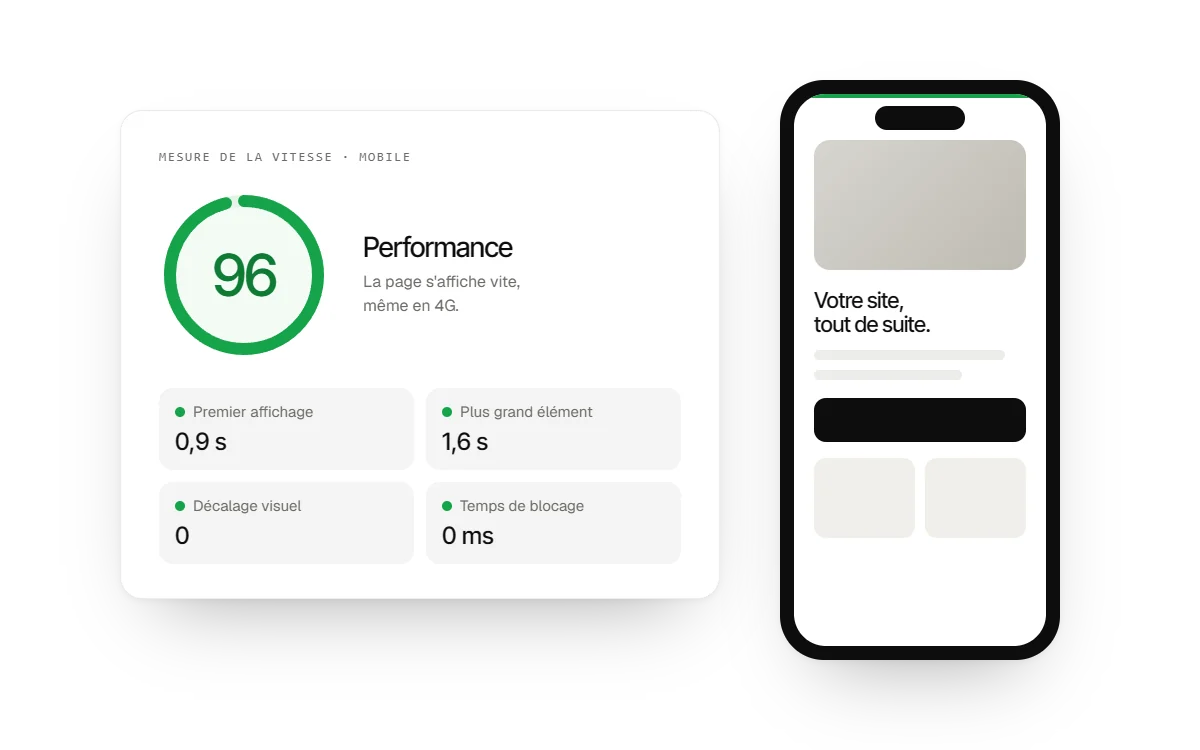
- PageSpeed Insights : the simplest. It gives a score out of 100, Google's three metrics and the list of things to fix.
- Google Search Console, “Core Web Vitals” report: an overview of all your pages, sorted into “good”, “needs improvement” and “poor”. This is the report to follow over time.
- Lighthouse, built into the Chrome browser (right-click, “Inspect”, Lighthouse tab): the same analysis as PageSpeed Insights, useful to test a page before it goes live.
- WebPageTest : more technical, it shows the loading frame by frame and every file downloaded. Handy to find the script or image that is blocking.
Reading the result: real data and simulation
PageSpeed Insights shows two blocks that should not be confused:
- “Discover what your real users are experiencing” : measurements taken from real visitors using Chrome, over the last 28 days. These are the ones Google uses. They only appear if your site has enough traffic.
- “Diagnose performance issues” : a simulation on an average phone with a slow connection. The score out of 100 comes from it, and it is what helps you find what to fix.
The simulation score varies from one test to the next, sometimes by several points: the network and the server never respond in exactly the same way. Run two or three tests before drawing conclusions.
Google's three metrics
Google sums up the loading experience in three measurements, the “Core Web Vitals”. A page is considered good when at least 75% of visits meet the following thresholds:
| Metric | What it measures | Good | Needs improvement | Poor |
|---|---|---|---|---|
| LCP | The time it takes to display the main element (large image, heading) | ≤ 2.5 s | ≤ 4 s | > 4 s |
| INP | The delay between a tap or click and the page's response | ≤ 200 ms | ≤ 500 ms | > 500 ms |
| CLS | Elements that move while the page loads | ≤ 0,1 | ≤ 0,25 | > 0,25 |
INP replaced the old FID in March 2024: if a tool or article still talks about FID, it is out of date.
Fixes, metric by metric
LCP too long: the page takes time to appear
- Images, almost always the first culprit: photos that are too heavy, too large for the screen, in an old format. Resizing them and converting them to WebP often cuts their weight considerably.
- Image sizes suited to the screen : a phone does not need the photo intended for a large screen. The code can offer several sizes and let the browser choose.
- The main image loaded first, and never lazily: it is the one people are waiting for.
- Hosting : a slow server delays everything else. The server response time appears in the PageSpeed Insights diagnosis.
- Fonts : too many weights and variants to download before the text can be displayed.
INP too high: the page responds poorly to taps
- Scripts added over time : tracking tools, chats, social media widgets, banners. Each one keeps the phone busy; keep only those that are really useful.
- Plugins and page builders (on WordPress, Wix…) that load code on every page, even where it is not needed.
- Heavy animations that run all the time, even off screen.
CLS too high: elements jump around
- Image dimensions set in the code, so the browser reserves their space before receiving them.
- Banners and pop-ins (cookies, promotions) inserted at the top of the page after loading: it is better to display them over the content.
- Fonts that change the size of the text when they arrive: they can be preloaded, or paired with a fallback font of a similar size.
What we did on thrpub.fr
To give a concrete example, here are the choices made on our own website:
- each image exists in several sizes, and the phone downloads the smallest one it needs;
- every image has its dimensions in the code, so nothing moves while loading;
- fonts are hosted on the site, embedded in the page and preloaded, with no call to an external service;
- the first screen is displayed without waiting for JavaScript;
- animations only run while they are visible on screen, and stop if the visitor has asked for reduced motion in their settings.
Don't chase a perfect 100
The score out of 100 is a benchmark, not a goal in itself. A site that displays its content quickly, stays stable and responds to every tap is a good site, even at 90. Better to fix the three metrics than to chase the last points, and never sacrifice useful content to gain a tenth of a second.
FAQ
What is a good loading speed?
The main element of the page should appear in under 2.5 seconds (the LCP), for at least 75% of visits. That is the threshold Google uses.
Does speed affect SEO?
Yes, but modestly: it is one of the page experience signals Google takes into account, and the relevance of the content matters more. Its main effect lies elsewhere: a slow site loses visitors, and therefore enquiries.
How can I test my website's speed for free?
With PageSpeed Insights (pagespeed.web.dev): paste the address of a page and look at the mobile result. To follow all your pages, use the “Core Web Vitals” report in Google Search Console.
Why is my site slow on mobile but not on desktop?
A phone has a less powerful processor and often a slower connection. Heavy images and many scripts, almost invisible on a recent computer, slow a phone down noticeably.
Should I rebuild my site if it is slow?
Not necessarily. Start with the images and unnecessary scripts: that is often enough. A redesign makes sense when the site relies on a theme or page builder that is too heavy, or no longer meets your needs.
THRPUB websites are custom-built, with no page builder or unnecessary plugins: that is what makes them fast from day one. If yours is slow, see how we create and redesign websites, or write to us : we will look with you at what is slowing it down.
 Written byMartin ThéryFounder of THRPUB
Describe your project: Martin will reply in writing, with tailored advice.
Ask my question